Integrating MultiType Pixel Compact Bold Into Modern Design Workflows
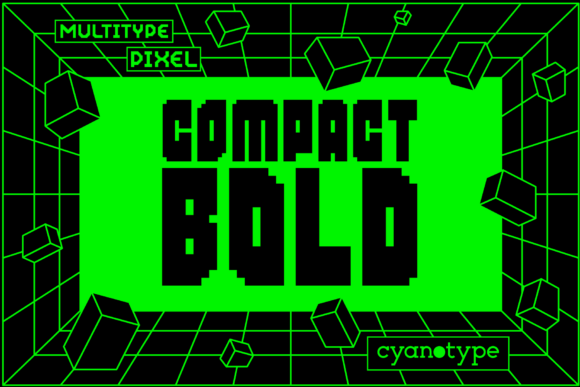
In the landscape of digital typography, selecting a typeface is rarely just an aesthetic choice; it is a structural decision that impacts readability, brand identity, and technical performance. For professionals seeking to inject a specific retro-futuristic or gaming-inspired vibe without sacrificing legibility, MultiType Pixel Compact Bold has emerged as a distinct tool in the designer’s arsenal. This font is not merely a decorative afterthought but a functional asset designed for creators who need a cool, uniquely shaped, pixelated display font that commands attention while maintaining a structured grid.
The rise of neo-brutalism, synthwave aesthetics, and 8-bit nostalgia in modern UI/UX design has created a renewed demand for fonts that bridge the gap between vintage hardware limitations and contemporary high-resolution displays. MultiType Pixel Compact Bold fits squarely into this niche. It offers a distorted and trendy touch to your designs, allowing marketers, developers, and hobbyists to break away from the monotony of standard sans-serifs. However, integrating such a specialized typeface requires more than just dragging it into Adobe Illustrator or Figma. It demands an understanding of its encoding, its visual weight, and how it interacts with other elements in a layout.
Understanding the Technical Foundation: PUA Encoding
Before diving into creative applications, it is crucial to understand the technical architecture of the font, as this dictates how you will use it in practice. MultiType Pixel Compact Bold is PUA encoded. The Private Use Area (PUA) is a section of the Unicode standard reserved for private agreement among users, meaning characters are mapped to code points that do not have predefined meanings in standard text processing.
For the end-user, this translates to significant flexibility. Because it is PUA encoded, you can access all glyphs and swashes with ease, provided your software supports direct character input or glyph panel selection. This feature is particularly valuable for designers who want to create custom logos or unique headers where standard keyboard typing falls short. Instead of relying on limited default characters, you can pull specific stylistic alternates, extended symbols, and decorative variants directly from the font file.
However, this convenience comes with a caveat regarding compatibility. When embedding this font into websites or sharing files across different operating systems, you must ensure that the recipient has the font installed or that it is properly web-fonted. Unlike standard Unicode fonts that render universally, PUA fonts rely on the specific font file being present to display the correct visual output. Therefore, when planning a project workflow, always include font licensing and distribution protocols early in the preparation phase.
Strategic Placement in Visual Hierarchy
One of the most common mistakes creators make with pixelated fonts is overuse. MultiType Pixel Compact Bold, with its bold weight and compact structure, is designed for impact, not body copy. Its primary role in a design process is to serve as a headline, a logo mark, or a key accent element. Understanding where it fits in the visual hierarchy ensures that the "distorted and trendy touch" enhances rather than overwhelms the message.
- Header Design: Use the font for main titles on landing pages, blog posts, or presentation slides. The compact nature allows for longer headlines to fit within constrained spaces without losing readability.
- Button Labels: In UI design, this font works exceptionally well for call-to-action buttons where a playful yet firm tone is desired. The boldness provides enough contrast against white or light backgrounds to guide user interaction.
- Iconography Integration: Because of the PUA encoding, you can mix text with icon-like glyphs. This is useful for creating cohesive sets of navigation elements or feature lists that maintain a unified aesthetic language.
When implementing this font, consider the surrounding whitespace. Pixel fonts thrive on clarity. If you crowd the text with dense paragraphs or complex imagery, the individual pixels may blur together at smaller sizes, reducing legibility. Leave room for the font to breathe. This principle applies whether you are designing a mobile app interface or a printed poster.
Compatibility with Digital Platforms
In today’s multi-platform environment, consistency is key. MultiType Pixel Compact Bold must perform well across various screen densities. On high-DPI (Retina) displays, the sharp edges of the pixels remain crisp, preserving the intended aesthetic. On lower-resolution screens, however, aliasing artifacts may appear if the font size is too small. To mitigate this, establish a minimum font size guideline within your style guide. For example, never use this font below 16px for any interactive element unless testing confirms readability on target devices.
Furthermore, when collaborating with developers, provide clear instructions on how to implement the font. If using CSS, ensure that the @font-face rule correctly references the PUA-encoded glyphs. Developers should be aware that some older browsers or assistive technologies might struggle with non-standard Unicode mappings. Testing with screen readers is essential to ensure that the content remains accessible, even if the visual presentation is stylized.
Workflow Integration and Asset Management
For freelancers and agency teams, managing specialized fonts like MultiType Pixel Compact Bold requires organized asset management. Simply saving the .ttf or .otf file in a shared drive is often insufficient. A robust workflow involves categorizing the font by use case—such as "Headers," "Accents," and "Full Glyph Sets"—and documenting which PUA characters correspond to which visual elements.
Create a reference sheet or a mini-style guide that maps out the available swashes and alternate characters. This document serves as a single source of truth for all team members, ensuring that everyone uses the same variations of the font. This consistency is vital for brand recognition. If one designer uses a specific swash for a product name and another uses a different variant, the brand voice becomes fragmented.
Additionally, consider the file size implications. Pixel fonts can sometimes be larger than standard geometric fonts due to the complexity of their glyph outlines. If you are optimizing for web performance, check the file size before deployment. Tools like Font Squirrel’s Webfont Generator can help convert the font into efficient web formats (WOFF2), reducing load times without compromising visual quality.
Creative Applications Beyond Standard Text
The versatility of MultiType Pixel Compact Bold extends beyond traditional text layout. Its unique shape allows for experimental techniques that can elevate a project from ordinary to memorable. Here are several practical ways to integrate this font into broader creative processes:
- Logo Construction: Combine the font with simple geometric shapes to create a logo that feels both nostalgic and modern. The compact bold style pairs well with monochrome palettes or neon accents, depending on the industry.
- Poster and Event Design: For music festivals, tech conferences, or gaming tournaments, this font instantly communicates the theme. Use it in conjunction with glitch art effects or scanline overlays to enhance the distressed aesthetic.
- Merchandise Printing: When preparing files for print-on-demand services, ensure that the vector paths of the PUA glyphs are correctly outlined. This prevents rendering issues during the printing process, especially when scaling the design for t-shirts, mugs, or stickers.
Another advanced technique involves layering. Try placing a slightly offset duplicate of the text in a contrasting color to create a pseudo-3D or chromatic aberration effect. This adds depth and reinforces the "distorted" characteristic mentioned in the font’s description, making the design pop on social media feeds where quick visual engagement is critical.
Quality Control and Long-Term Viability
As trends shift, so does the relevance of certain typographic styles. While pixel fonts have seen a resurgence, they can quickly become dated if used incorrectly. To ensure long-term viability, focus on timeless pairing strategies. Pair MultiType Pixel Compact Bold with clean, neutral sans-serif fonts for body text. This contrast creates a balanced composition where the pixel font acts as an anchor without dominating the reading experience.
Regularly audit your designs to ensure the font still aligns with current accessibility standards. As web accessibility guidelines evolve, ensure that your use of stylized text does not compromise contrast ratios or readability for users with visual impairments. The goal is to enhance the user experience, not hinder it.
Ultimately, MultiType Pixel Compact Bold is more than just a font; it is a strategic tool for communication. By understanding its technical constraints, respecting its visual weight, and integrating it thoughtfully into your workflow, you can leverage its unique characteristics to create designs that are both visually striking and functionally sound. Whether you are a solo entrepreneur crafting a brand identity or part of a large marketing team launching a campaign, this font offers a reliable way to add personality and precision to your work.
Start by experimenting with small elements—button labels, section headers, or social media graphics—to gauge audience reaction. Gather feedback, refine your usage guidelines, and gradually expand its application as you become more comfortable with its nuances. In doing so, you transform a simple typeface choice into a cohesive component of your overall design strategy.