The Riverstone: Elevating Your Designs with Classic Vintage Charm
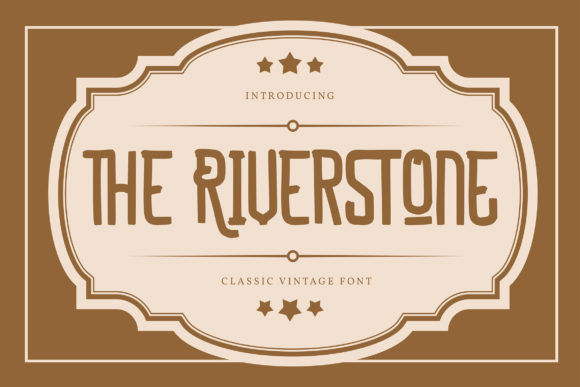
When you are looking to inject a sense of timeless elegance into your visual projects, The Riverstone often appears on the shortlist of designers and creators. It is not just another display font; it is a classic, vintage-styled typeface that brings an immediate air of sophistication and trendiness to any composition. Whether you are designing a wedding invitation, branding for a boutique coffee shop, or a header for a high-end blog post, The Riverstone offers a distinctive character that can elevate each of your creations.
However, simply having access to a beautiful font is only half the battle. Many users download The Riverstone expecting instant magic, only to find their designs lacking impact or suffering from technical glitches. Understanding the nuances of this specific typeface—particularly its encoding and application—is crucial for achieving professional results. This guide aims to help you navigate those pitfalls, ensuring you get the most out of this stylish tool.
Understanding the Appeal of The Riverstone
The primary reason creators gravitate toward The Riverstone is its ability to bridge the gap between retro nostalgia and modern minimalism. Its vintage styling provides warmth and personality, while its clean lines ensure readability even at larger sizes. This balance makes it incredibly versatile. You might use it for a main headline to grab attention, or pair it with a simpler sans-serif body text to create a harmonious contrast.
For entrepreneurs and small business owners, typography is a silent salesman. A well-chosen font like The Riverstone communicates quality and attention to detail before the customer even reads the copy. It suggests that you care about aesthetics, which builds trust. For bloggers and educators, it adds a layer of authority and charm to educational materials or lifestyle content, making complex information feel more approachable and engaging.
Common Misconceptions About Font Encoding
One of the most significant areas where users stumble involves the technical specifications of the font file. The Riverstone is PUA (Private Use Area) encoded. While this sounds technical, understanding what it means can save you hours of frustration and prevent costly rework.
What is PUA Encoding?
In standard Unicode fonts, every character has a fixed position in the code table. However, in PUA-encoded fonts like The Riverstone, the glyphs are mapped to unused slots in the Private Use Area of the Unicode standard. This allows designers to include extensive swashes, alternate characters, and decorative elements without cluttering the standard character set.
The Mistake:
Many beginners assume that because they have installed the font, all its features are automatically accessible via standard keyboard shortcuts. They type "A" and expect a swash variant, or they try to search for specific decorative glyphs in their design software’s character panel, only to find nothing. This leads to confusion and the false impression that the font is incomplete or low-quality.
The Solution:
To access all the glyphs and swashes with ease, you must use the dedicated tools provided by your design software or the font’s documentation. In applications like Adobe Illustrator, Photoshop, or InDesign, you need to open the Glyphs panel. Here, you will see the full range of available characters, including the special swashes that give The Riverstone its trendy and stylish flair. Do not rely on typing alone; manually select these variants to unlock the font’s full potential.
Overlooking Context and Pairing
Another frequent error is using The Riverstone as the sole typeface for an entire layout. While it is a powerful display font, it is not designed for long blocks of body text. Its vintage details and unique shapes can become difficult to read when scaled down or used in paragraphs.
If you attempt to set a 500-word article entirely in The Riverstone, your audience will likely skim past it due to eye strain. Instead, use it strategically. Let it shine in headlines, quotes, logos, or key call-to-action buttons. Pair it with a neutral, highly readable font for the supporting text. This contrast enhances the overall presentation and ensures your message is communicated clearly and efficiently.
Evaluating Quality Before You Buy or Download
Before committing to The Riverstone for a major project, take a moment to evaluate how it fits your specific needs. Not every vintage font works for every brand identity. Consider the following checks:
- Legibility at Small Sizes: Test the font in your actual design environment. Does it remain clear when printed on business cards or viewed on mobile screens? If the details become muddy, it may be too ornate for your intended use.
- Licensing Compatibility: Ensure the license covers your intended use case. Whether you are a freelancer creating assets for clients or a marketer running ads, verify that commercial usage is permitted. Ignoring licensing terms can lead to legal issues and unexpected costs.
- Weight Variations: Check if the font family includes multiple weights (light, regular, bold). Having options allows you to create hierarchy within your design, guiding the viewer’s eye effectively.
By conducting these checks, you avoid the disappointment of discovering mid-project that the font lacks the necessary versatility or legal clearance for your campaign. This proactive approach saves time and protects your professional reputation.
Maximizing Efficiency in Your Workflow
Once you have decided to use The Riverstone, streamline your process to maintain efficiency. Since accessing swashes requires manual selection, consider creating a custom library or preset in your design software. Save your favorite combinations of headers and body text that work well with The Riverstone. This way, you can replicate successful layouts quickly for future projects, whether you are working on social media graphics for a hobbyist page or a comprehensive brand identity for a startup.
Additionally, keep your software updated. Older versions of design programs may not handle PUA-encoded fonts as smoothly as newer ones, potentially leading to rendering issues or missing glyphs. Ensuring your tools are current helps you access all features without technical hindrance.
Conclusion: Making Informed Creative Choices
The Riverstone is more than just a pretty face in your toolkit; it is a strategic asset when used correctly. By understanding its PUA encoding, respecting its limitations as a display font, and pairing it wisely, you can create designs that are both visually striking and functionally effective. Avoid the common traps of misusing glyphs or overloading layouts with decorative text. Instead, focus on clarity, context, and correct application. When you approach The Riverstone with knowledge and intention, it will undoubtedly elevate your creations, leaving a lasting impression on your audience.
Remember, good design is about more than just picking a popular font. It is about making informed decisions that support your communication goals. Take the time to learn the specifics of The Riverstone, experiment with its swashes, and integrate it thoughtfully into your workflow. The result will be a polished, professional look that stands out in today’s crowded digital landscape.